Rocket Streaming Blog

Streaming Audio News and Tips


Articles in the Announcements category

Rocket Broadcaster Logo Rocket Broadcaster 1.4.13 Released

We're pleased to announce the release of Rocket Broadcaster 1.4.13. This cumulative update includes improvements to the Broadcast Audio Processor, bugfixes, and more.

Here's what's new in Rocket Broadcaster 1.4.13:

Bass Exciter and High Frequency Exciter PRO

The Broadcast Audio Processor has been upgraded with two brand-new components, a Bass Exciter and High Frequency Exciter. The Bass Exciter helps enhance your audio stream with a powerful, satisfying low-end. The High Frequency Exciter similarly boosts your high-end with enhanced clarity and harmonics, which fill out your sound. All of our built-in presets have been updated to take advantage of these new exciters.

We've also tweaked the Automatic Gain Control (AGC) to make it more subtle and less likely to overreact for some types of audio. A new Processing Gate parameter has been added, which freezes the AGC if the signal drops below a particular threshold.

For more on the new features, head over to the Broadcast Audio Processor documentation.

Extended Metadata and Artwork for RSAS and Radio Mast

This release includes preliminary support for a new "Modern Metadata" API available on Radio Mast and coming to the next release of RSAS. With this new API, the complete set of metadata provided from your radio automation system is passed through to the streaming server and made available to players. You will be able to finally move beyond just showing "artist" and "title" in your players, to show other fields like the album and genre. This opens up the possibility to even make your player react to the track category, such as showing your station logo during station IDs.

As part of this new metadata integration, we have also invented a new mechanism where if your radio automation system exposes the cover art for the currently playing track, Rocket Broadcaster can then pass that cover art image along to the streaming server, for it to be displayed to listeners. Instead of relying on hacky iTunes and Amazon brute-force searches for cover art, we hope to help the radio industry move to a more reliable, standardized system where your cover art is managed by your radio automation system and passed through your encoder to your listeners. This will help prevent embarrassing situations where mismatched cover art is seen by listeners and finally give you full control over the artwork displayed alongside your stream, without introducing complex new systems.

With this update, artwork passthrough is supported with the following radio automation systems or metadata formats:

We have analyzed 22 other radio automation systems that we would like to support, but we need the developers behind those systems to export cover art with their metadata. If you want a seamless cover art solution, you can help by asking your radio automation vendor to contact us, and we can work together to get it supported.

We'll go into more detail on how this new Modern Metadata API and cover art mechanism works in a future blogpost, when the next RSAS update is available (soon).

Raw FLAC Encoding Support

This update adds support for native raw FLAC encoding, which sheds the Ogg container in favour of FLAC's native framing. For historical reasons, FLAC internet radio streams have been encapsulated inside an Ogg container. The Ogg container format offers some advantages on paper, but has some disadvantages in the real-world which make it more difficult to use for streaming. Shedding the Ogg container allows a compatible streaming server, such as the upcoming RSAS release, to more gracefully handle source reconnections without dropping listeners, and stitch together a stream that players will tolerate.

Because Icecast was very late in supporting raw FLAC framing, there are almost no raw FLAC streams on the internet, and the ecosystem to support it is underdeveloped. To help nudge the industry forward with more reliable lossless streaming, in addition to adding support for raw FLAC to Rocket Broadcaster, we are also introducing raw FLAC support in the next update to RSAS and across our Radio Mast streaming services. To help developers ensure their players are compatible with raw FLAC streams, we have published a public FLAC test stream on our Reference Streams page, which can be used for QA testing.

On the playback side, raw FLAC streams can be played in Chrome and Firefox on Windows and through FFMPEG, but support elsewhere is lacking. As of today, iOS Safari and Chrome, VLC, Foobar2000, and mpv do not support raw FLAC streams. If you would like to use raw FLAC streaming, you can help by asking the developers of these projects to support raw FLAC and sharing our test stream with them.

Full List of Changes

Features:

  • Broadcast Audio Processor improvements:
    • New Bass Exciter and High Frequency Exciter, inspired by famous vintage hardware.
    • Added a "Processing Gate" to the AGC, to reduce overreactivity.
    • Updated presets to take advantage of the new features.
    • Two new presets: Radio Dynamics, and Polished, which use the AGC in RMS mode.
  • Modern Metadata API Support
    • Added support for RSAS's new Modern Metadata API, which includes passing more metadata fields along to listeners, including artwork from your radio automation system.
    • Supports Axel Tech DJ Pro, Audio Hijack, Jazler SOHO, and ProppFrexx ONAIR.
  • Raw FLAC encoding support (sans Ogg container).
  • Custom Metadata Output now supports two-line output.
  • Allow Shoutcast 1.x special characters error to be ignored, for compatibility with Azuracast.
  • Improved data validation in the Streams dialogue to reduce common mistakes.
  • Hide source kick message box automatically if a subsequent connection attempt succeeds.
  • Pass keyboard events through to VST windows, and window sizing fix for Stereo Tool.
  • New Metadata Formats:
    • Added DJB Radio On-Air metadata support.
    • Added Audio Hijack metadata support, used by Now Playing Pro.

Bugfixes:

  • Fixed "Monitor Master Output" resetting to off after restarting application.
  • Fixed rare bug where TLS streams could disconnect without the application detecting.
  • Automatically reset the Integrated Loudness measurement when changing the AGC power target.
  • Fixed binding to a specific NIC if your NIC has multiple IPs.
  • Fixed clock drift compensation bug if input and output devices had different samplerates.
  • Detect and report more "Audio Device Error" scenarios.
  • Metadata: Avoid sending the hyphen if the artist or title is empty.
  • Fixed "Link with Radio Mast" feature not reconnecting after connection loss.
  • Fixed a recording bug where recordings could still happen when low on disk space.
  • Fixed metadata compatibility with Shoutcast 2.4.2.167.

Download the Update

Rocket Broadcaster Logo Rocket Broadcaster 1.4 Released

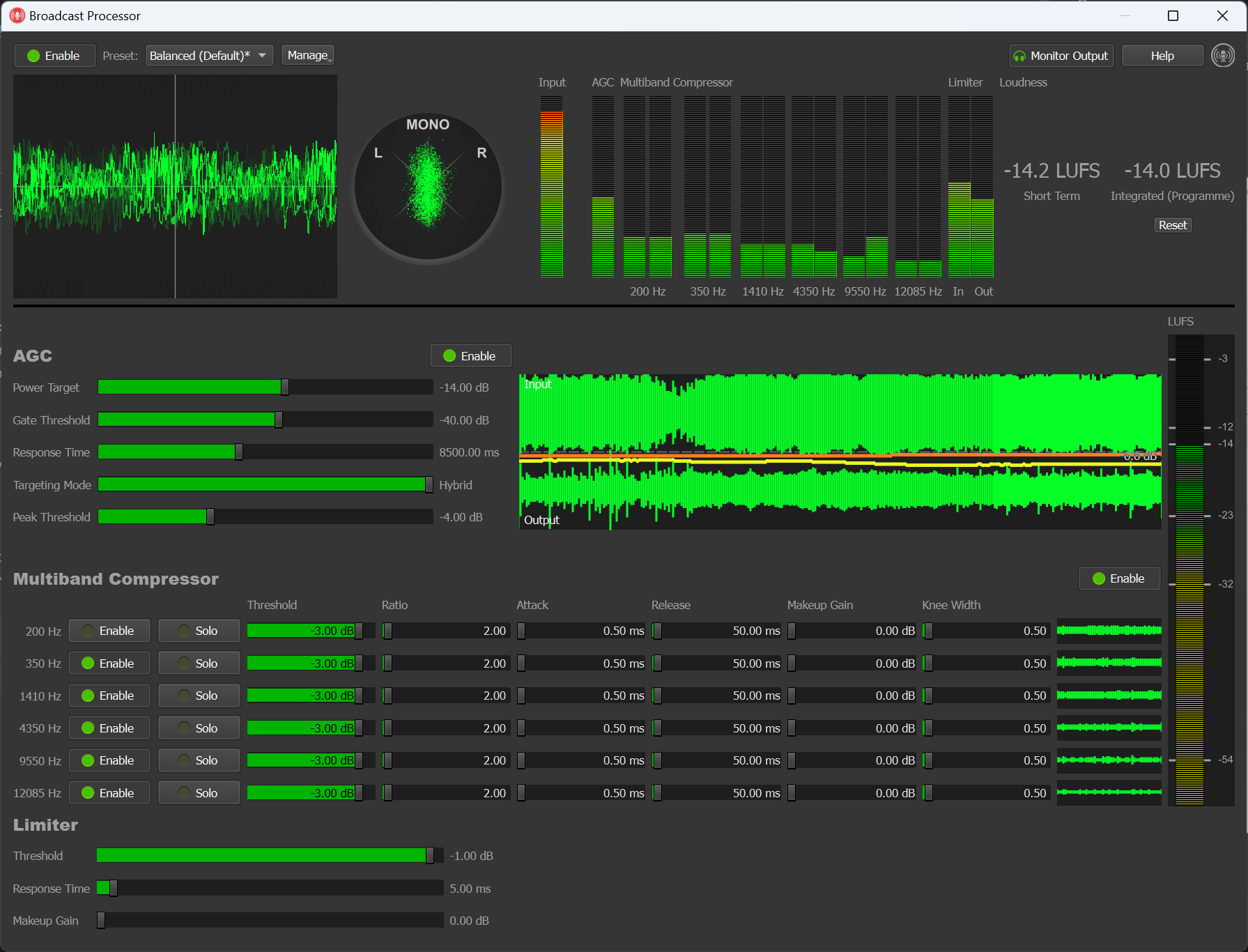
Screenshot of the Broadcast Audio Processor in Rocket Broadcaster Pro

We're pleased to announce the release of Rocket Broadcaster 1.4. This major update adds the brand new Broadcast Audio Processor, an automatic configuration backup system, and improved connectivity for Radio Mast.

Here's what's new in Rocket Broadcaster 1.4.0:

Broadcast Audio Processor PRO

Our brand new Broadcast Audio Processor improves the sound of your stream by providing consistent loudness and mastering of your audio. By using ITU BS.1770 loudness metering (LUFS), our unique hybrid two-stage AGC ensures your stream hits a consistent loudness target, so listeners can hear it comfortably on all devices.

The Broadcast Audio Processor also includes a Multiband Compressor and Peak Limiter, with 9 easy presets, to help you shape the sound of your radio station. Our signal processing chain gives your stream that "radio" sound, making it loud and clear on a variety of devices.

For more information, check out our page on the Broadcast Audio Processor and the documentation for it.

Upgrading to Rocket Broadcaster Pro 1.4? Watch our 2-minute crash course on the new Broadcast Audio Processor:

Other New Features

Soundcard Clock Drift Compensation

When using different input and output devices, Rocket Broadcaster now transparently compensates for clock sync drift. This solves an issue where mixing different input and output devices could sometimes result in a choppy stream over long periods of time.

Enhanced Connectivity for Radio Mast

We've added a new "Radio Mast" stream connection type, which provides better connectivity to Radio Mast servers. It will automatically choose the closest server region for you and failover to the next nearest region if your ISP loses the ability to reach it.

Automatic Config Backup System

We've added a system to automatically save a backup of your settings on your PC, to help prevent losing your settings if your PC is shutdown improperly or your settings are corrupted. If your settings are corrupted and a backup is available, you'll be asked if you'd like to restore from backup. This prompt is on a timer which automatically accepts the backup option after 45 seconds, to help ensure operation is automatically restored without human intervention.

Other New Features:

  • Stream Diagnostic - We've improved the explanations of some common issues in the Stream Diagnostics.
  • More keyboard shortcuts - Added keyboard shortcuts for mute mic (CTRL+M), opening the Broadcast Processor (CTRL+B), and monitoring master output (CTRL+O).

Bugfixes

  • Fixed a rare crash that could happen on certain systems over long periods of time.
  • Fixed a rare issue that could cause settings to get lost during unexpected shutdown.

Download the Update

Rocket Broadcaster Logo Rocket Broadcaster 1.3.43 Released

We're pleased to announce the release of Rocket Broadcaster 1.3.43. This is a minor maintenance release that mainly brings a couple of bugfixes.

Here's what's new in Rocket Broadcaster 1.3.43:

  • Audio Input volume control now saves across restarts
  • System Audio Capture can now be disabled in the Preferences dialog.
  • Improved compatibility with high DPI displays and display scaling. Rendering is greatly improved on 4K displays with display scaling.
  • Improved the way soundcards are enumerated, to improve device compatibility and fix some bugs:
  • Fixed a bug causing some MME sound devices to open in mono.
  • Fixed some inconsistencies with devices that differed in capabilities depending on the selected Audio API.
  • Fixed a bug causing the Broadcast Wizard settings to not apply.

Download the Update

Rocket Broadcaster Logo Rocket Broadcaster 1.3.42 Released

We're pleased to announce the release of Rocket Broadcaster 1.3.42, which includes a number of small bugfixes and minor features.

Here's what's new in Rocket Broadcaster 1.3.42:

  • Added support for new metadata formats:
    • AudioVault AVAir
    • Westwood One Storq
    • Arrakis New Wave Format 5
  • Show a low disk space warning in the Preferences dialog if there is insufficient space for recordings.
  • Fixed a rare issue where dozens of consecutive automated reboots could eventually cause the application to fail to launch on startup.
  • Fixed a compatibility issue with screen readers (bug introduced in version 1.3.39)
  • Fixed an issue caused by attempting to record with less than 30% disk space free

Introducing HLS at Radio Mast

We're also pleased to announce HLS support for MP3 and AAC streams is now available as a free upgrade for all users on the Radio Mast Streaming Network. HLS provides a better listening experience for mobile listeners by allowing listeners to seamlessly switch between Wifi and cellular networks interrupting playback, as well as improving battery life.

Getting an HLS audio stream is now easier than ever before - simply create a stream on Radio Mast and connect your encoder. Your MP3 or AAC stream will be available not only as a conventional HTTP(S) stream, but now also as an HLS stream. No reconfiguration or expensive extra software is required, and this feature is available at no additional cost to Radio Mast users.

Learn more about HLS at Radio Mast on our blog.

New to HLS? Check out our quick primer, "What is HLS for Audio?"

Download the Update

Feedback

Rocket Broadcaster development is driven by your feedback, and all of the changes above were made as the result of feedback from users. If you're looking for a missing feature, or have ideas for how we can make Rocket Broadcaster even better, please let us know!

Rocket Broadcaster Logo Rocket Broadcaster 1.3.34 Released

We're pleased to announce the release of Rocket Broadcaster 1.3.34, which includes a number of small bugfixes and minor features. This is a cumulative update and includes changes made since January.

The new features in Rocket Broadcaster 1.3.34 are:

  • Improved reconnection logic, optimized for high reliability platforms like Radio Mast.
  • "Generic INI file" metadata format parser, allowing INI files to be parsed for metadata.
  • Metadata remapper: In the Metadata Processor, there is a new "Advanced" button which can be used to remap metadata fields. This is particularly useful when parsing generic INI files, allowing you to map various key/value pairs onto standard fields like "artist" or "title".


Bugfixes and other tweaks include:

  • Allow @ symbols in Legacy Shoutcast 1 Passwords, and warn about forbidden characters.
  • Fixed a bug where muting a channel could cause distorted audio over time
  • Fixed a recording bug where leftover audio could sometimes be saved when splitting files or toggling recording.
  • Disabled Audio Output (for local monitoring) by default, to reduce likelihood of misconfiguration

Download the Update

Feedback

Rocket Broadcaster development is driven by your feedback, and all of the changes above were made as the result of feedback from users. If you're looking for a missing feature, or have ideas for how we can make Rocket Broadcaster even better, please let us know!

RSAS Logo Rocket Broadcaster 1.3.27 Released and RSAS Status Update

We're pleased to announce the release of Rocket Broadcaster 1.3.27. Over the last year, we've quietly released several incremental updates with small bugfixes and support for new metadata formats. The cumulative number of changes is now substantial and worth an upgrade for most users.

The changes in Rocket Broadcaster 1.3.27 are:

  • Improved WASAPI compatibility with some soundcards with limited sample formats. This should fix the dreaded "Audio Device Error" with some finicky soundcards.
  • Fixed compatibility issue causing distorted output with some ASIO devices
  • Fixed ASIO input volume control and master monitoring


Other recent features and fixes include:

  • Allow disabling Audio Output and using Input Device as the clock source. (A valid output device is no longer required.)
  • Multiple application instances will now use separate log files.
  • Support for Seamless Takeover with RSAS. Broadcasters can now takeover a stream and boot an existing source.
  • Implemented restarting of System Audio Capture if it fails (useful with Microsoft Remote Desktop)
  • Accessibility improvements. (We provide a VPAT too here.)
  • Improved firewall compatibility with Icecast protocol
  • Fixed iMediaTouch XML metadata setting not loading correctly.
  • Fixed rare issue that could cause metadata updates to fail on some PCs.
  • Fixed Stream Diagnostic with Shoutcast 2 connections


Since our previous major update, we've added support for the following metadata formats:

  • RCS Zetta Lite XML
  • RCS Master Control
  • Dinesat Pro Radio
  • Axel Tech DJ Pro
  • Jazler SOHO
  • Dalet XML


For more information, please see our full list of supported metadata formats or our list of compatible radio automation systems.

Download the Update

Feedback

Lastly, your feedback is what helps drive Rocket Broadcaster development. If you're looking for a missing feature, or have ideas for how we can make Rocket Broadcaster even better, please let us know!

RSAS Status Update

RSAS is still under heavy development and we've quietly released many alphas of the 0.1.21 series, which is now likely to evolve into a proper "1.0" release. This next release will see improved HTTP/1.1 support for serving static files and podcasts, support for preroll and postroll jingles/ads, the option to auto-stop relays, a significant number of bugfixes, and with any luck, some form of HLS support. All of those feature are already complete, but HLS still needs some polish before we can ship it. Stay tuned for RSAS 1.0 news!

RSAS Logo Log4j Vulnerability Status - Not Vulnerable

We have been monitoring the recently discovered Log4j vulnerability (CVE-2021-44228) and have taken action to audit and monitor our infrastructure for potential risks. As creators of streaming audio software and a global streaming audio platform, we wanted to reassure broadcasters about the status of our products:

  • Rocket Broadcaster - Not vulnerable to the Log4j security vulnerability. Rocket Broadcaster and its third party components do not use Java nor Log4j.
  • Rocket Streaming Audio Server (RSAS) - Not vulnerable to the Log4j security vulnerability. Does not use Java.
  • Radio Mast - Not vulnerable to the Log4j security vulnerability. More details here.


For more information about the scope of this Log4j vulnerability and the steps we've taken to assess our infrastructure and keep broadcasters safe, please see our Log4J Vulnerability Update on the Radio Mast blog.

If you have any questions or concerns, please contact support.

Resources for Broadcasters: